

Hey there! As a supplier of flatbed printers, I often get asked about how to adjust the printing height of these machines. It's a crucial aspect that can significantly impact the quality of your prints, so I'm here to break it down for you in a simple and easy-to-understand way.
Why Adjusting Printing Height Matters
Before we dive into the how-to, let's talk about why adjusting the printing height is so important. The distance between the print head and the printing surface affects the ink droplet placement and the overall print quality. If the height is too high, the ink droplets may spread out too much, resulting in a blurry or pixelated image. On the other hand, if the height is too low, the print head may come into contact with the surface, causing damage to both the print head and the object being printed on.
Getting the right printing height ensures sharp, clear, and vibrant prints every time. It also helps to prevent issues like clogged print heads and uneven ink distribution, which can save you time and money in the long run.
Factors to Consider Before Adjusting
There are a few things you need to take into account before you start adjusting the printing height of your flatbed printer.
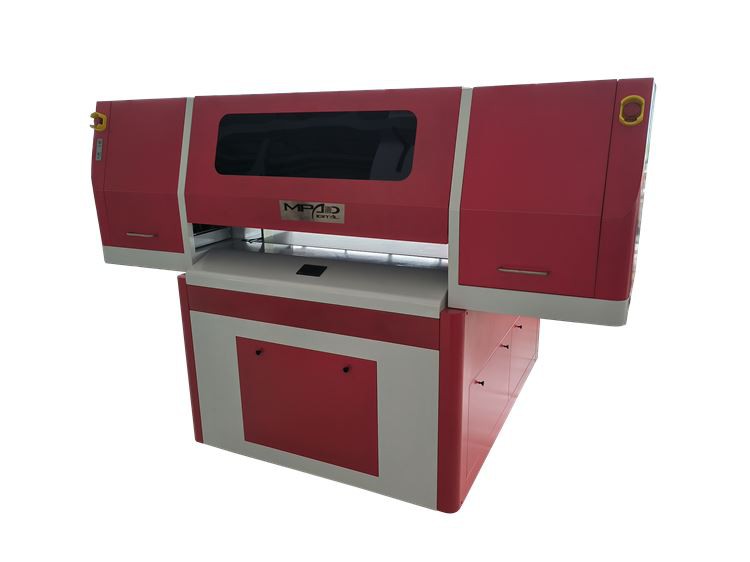
Type of Material
Different materials have different thicknesses and surface textures, which can affect the ideal printing height. For example, a thick piece of wood will require a different height setting than a thin sheet of plastic. Make sure you know the exact thickness of the material you're printing on before making any adjustments.
Print Resolution
The resolution of your print also plays a role in determining the optimal printing height. Higher resolution prints generally require a closer distance between the print head and the surface to ensure accurate ink droplet placement. If you're printing at a high resolution, you may need to adjust the height accordingly.
Printer Model
Each flatbed printer model has its own specific guidelines for adjusting the printing height. Refer to your printer's user manual for detailed instructions on how to make the adjustments. Some printers may have automated height adjustment features, while others may require manual adjustments using a control panel or a mechanical mechanism.
Step-by-Step Guide to Adjusting Printing Height
Now that you understand the importance of adjusting the printing height and have considered the relevant factors, let's walk through the process step by step.
Step 1: Prepare Your Printer
Before you start adjusting the height, make sure your printer is turned on and in a stable position. Remove any objects from the printing area and clean the surface to ensure a smooth and even printing surface.
Step 2: Measure the Material Thickness
Use a caliper or a ruler to measure the thickness of the material you're printing on. Make sure to measure at multiple points to account for any variations in thickness. Record the measurement so you can use it as a reference when making the height adjustments.
Step 3: Access the Height Adjustment Settings
Depending on your printer model, you may need to access the height adjustment settings through the printer's control panel, software, or a mechanical mechanism. Refer to your printer's user manual for specific instructions on how to access the settings.
Step 4: Make Initial Adjustments
Once you've accessed the height adjustment settings, start by making small adjustments to the height based on the thickness of your material. If you're not sure where to start, you can refer to the printer's recommended height settings for the type of material you're using.
Step 5: Test Print
After making the initial adjustments, perform a test print on a small area of the material. Check the print quality to see if the image is sharp and clear. If the print is blurry or pixelated, you may need to adjust the height further. If the print head comes into contact with the surface, you'll need to increase the height.
Step 6: Fine-Tune the Adjustments
Based on the results of the test print, make further adjustments to the height as needed. Keep making small adjustments and testing the print until you achieve the desired print quality.
Step 7: Finalize the Settings
Once you're satisfied with the print quality, save the height adjustment settings in your printer's memory. This will ensure that you can easily reproduce the same settings for future prints on the same type of material.
Tips and Tricks for Optimal Printing Height
Here are some additional tips and tricks to help you achieve the best possible printing height and print quality:
- Use a calibration tool: Some flatbed printers come with calibration tools that can help you accurately measure and adjust the printing height. If your printer has this feature, make sure to use it for more precise adjustments.
- Clean the print head regularly: A dirty print head can affect the ink droplet placement and the overall print quality. Make sure to clean the print head regularly according to your printer's maintenance instructions.
- Check the material alignment: Make sure the material is properly aligned on the printing surface to ensure even printing. If the material is not aligned correctly, it can cause the print head to come into contact with the surface or result in uneven ink distribution.
- Experiment with different settings: Don't be afraid to experiment with different height settings and print resolutions to find the optimal combination for your specific printing needs. Every material and printer is different, so it may take some trial and error to find the perfect settings.
Conclusion
Adjusting the printing height of a flatbed printer is a crucial step in achieving high-quality prints. By following the steps outlined in this guide and considering the factors mentioned, you can ensure that your prints are sharp, clear, and vibrant every time.
If you're in the market for a new flatbed printer, we offer a wide range of options, including Digital Flatbed UV Printer, Wide Format Flatbed Printer, and UV Printer Golf Balls. Our printers are designed to provide excellent print quality and reliability, and our team of experts is always available to help you with any questions or concerns you may have.
If you're interested in learning more about our flatbed printers or would like to discuss your specific printing needs, please don't hesitate to contact us. We're here to help you find the perfect solution for your business.
References
- Manufacturer's user manual for flatbed printers
- Industry best practices for flatbed printing