


Hybrid UV Printer
MPA Digital Technology : Your Trustworthy Hybrid UV Printer Supplier!
MPA Digital Technology Co., Ltd. (hereinafter referred to as MPAD) was established in 2012 and is composed of experts dedicated to the research and development of digital large-format printers. MPAD has an independent R&D team with rich experience and knowledge in large-format printer design, especially complete control systems for UV flatbed printers and UV roll-to-roll printers, allowing us to provide customers with stable and exciting products and continuous technological innovation.
Rich Products
We can produce UV printers, UV flatbed printers, UV roll printers, hybrid UV printers, single-channel inkjet printers, digital UV flatbed printers, high-speed UV printers, UV printer flatbed printers, and more.
Products Widely Used
The products we produce can be widely used in signage and graphics, interior decoration, textiles and apparel, outdoor advertising, labels and packaging, promotional products, fine art reproductions, architectural graphics and more.
Many Partners
We have customers and partners in many countries, including the United States, United Kingdom, Spain, Greece, Poland, Russia, India, Turkey, Kazakhstan, Singapore, Israel, United Arab Emirates, Algeria, etc.
Customizable
Our team has 10 years of professional R&D and production experience in the field of digital large-format printer product R&D and is able to meet the needs of different markets and customers.
-
![Hybrid Printing Machine]()
-
![UV Hybrid Printers]() UV Hybrid PrintersBeyonder 5200 Hybrid Printer-Our advanced UV printer offers high-speed precision printing with reduced ink consumption, utilizing cutting-edge technologies such as Maglev drive and LED UV curing....read more
UV Hybrid PrintersBeyonder 5200 Hybrid Printer-Our advanced UV printer offers high-speed precision printing with reduced ink consumption, utilizing cutting-edge technologies such as Maglev drive and LED UV curing....read more -
![LED Flatbed UV Printer]()
-
![UV Ink Jet Printer]()
-
![Hybrid Flatbed Printers]()
-
![Hybrid UV Printing Machine]() Hybrid UV Printing MachineBeyonder 5200 Hybrid Printer-Advanced Printing Precision and Efficiency with Cutting-Edge Technologyread more
Hybrid UV Printing MachineBeyonder 5200 Hybrid Printer-Advanced Printing Precision and Efficiency with Cutting-Edge Technologyread more -
![Hybrid UV Printing]() Hybrid UV PrintingBeyonder 3200 Hybrid Printer-NEW LOOK Advanced Features for Efficient, High-Quality Printing with Hybrid UV Technologyread more
Hybrid UV PrintingBeyonder 3200 Hybrid Printer-NEW LOOK Advanced Features for Efficient, High-Quality Printing with Hybrid UV Technologyread more -
![Hybrid Ink Printer]() Hybrid Ink PrinterHybrid 1900 UV Printer-Efficiency and Versatility: The UV Inkjet Printer Revolutionizes Printing Technologyread more
Hybrid Ink PrinterHybrid 1900 UV Printer-Efficiency and Versatility: The UV Inkjet Printer Revolutionizes Printing Technologyread more -
![UV Hybrid Roll To Roll Printer]()
-
![Versatile UV Hybrid Printer]()
-
![UV Hybrid Printer Flatbed]()
-
![UV Flatbed Roll To Roll Printer]()


A Hybrid UV Printer is a printing device that combines the capabilities of both traditional digital printing technology and the latest UV curing technology. This printer can create high-quality prints on a variety of substrates such as paper, plastics, wood, metal, and glass. The hybrid UV printer uses ultraviolet light to cure or dry the ink as it is printed on the substrate. This technology enables the printing of high-definition, rich color, and durable images that are resistant to fading, scratches, and water damage. It is commonly used in industries such as advertising, packaging, signage, and interior design.
Features of Hybrid UV Printer
Compatible With a Variety of Materials
Hybrid UV printers can print on most materials, including wood, acrylic, etc. This is helped by its ability to use different types of inks, such as soft and hard inks. Therefore, it can be used in a wide range of applications, especially in areas such as printing, signage and signmaking.
Higher Printing Speed
Hybrid UV printers can provide higher printing speeds because they use technology that ejects ink, unlike traditional printers that need to wait for the entire sheet of paper to enter the printer at once to print multiple pages of documents in a short time.
Higher Quality Images
The print quality of hybrid UV printers is higher than traditional printers. Because it can use different kinds of inks, this allows it to more accurately reproduce digital images, allowing for higher contrast, more subtle color transitions, and more accurate color accuracy.
Larger Working Area
Hybrid UV printers have a larger working area than traditional printers, allowing them to handle larger items. This is because it has a flatbed design that allows items to be printed on the platform instead of being constrained by paper.
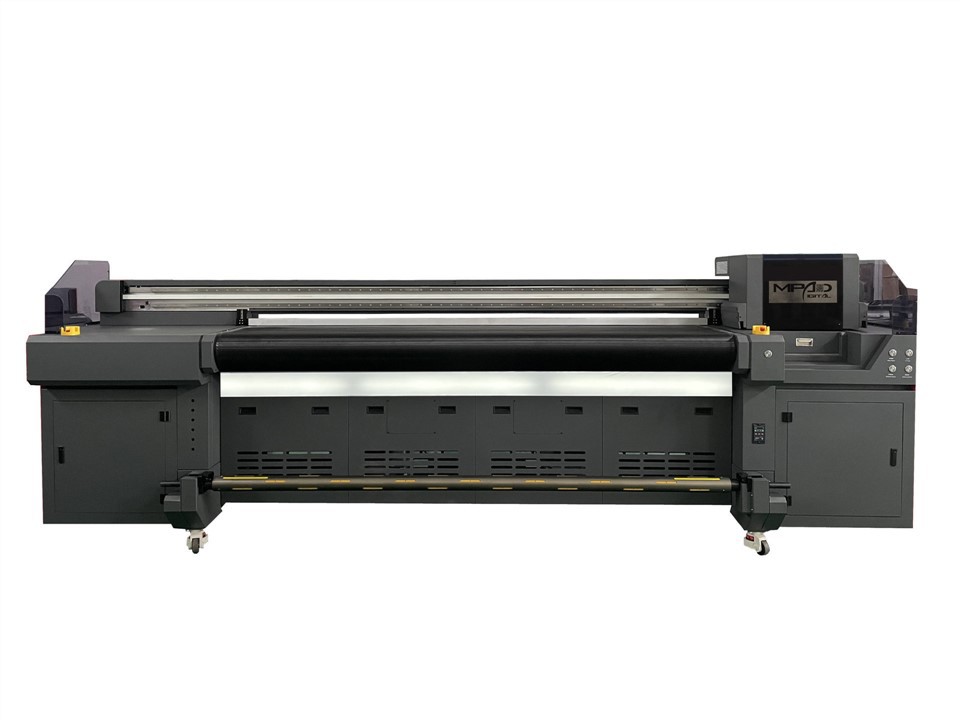
Types of Hybrid UV Printer
Flatbed Hybrid UV Printer
A flatbed hybrid UV printer is a type of hybrid printer that has a flatbed feature for printing on a wide range of materials. This printer can print on both rigid and flexible materials such as PVC, acrylic, metal, glass, textiles, and more. The flatbed feature is ideal for printing on thick materials or objects that are difficult to position or move. Flatbed hybrid UV printers are popular in sign-making, printing on promotional items, and industrial applications.
Roll-to-Roll Hybrid UV Printer
A roll-to-roll hybrid UV printer is designed for printing on roll-to-roll media. This type of printer is excellent for printing on long continuous materials such as banners, mesh, fabrics, and vinyl. This printer can also handle different types of media, including coated and uncoated materials. Roll-to-roll hybrid UV printers are ideal for printing on high-quality outdoor advertising materials such as street banners and storefront signage.
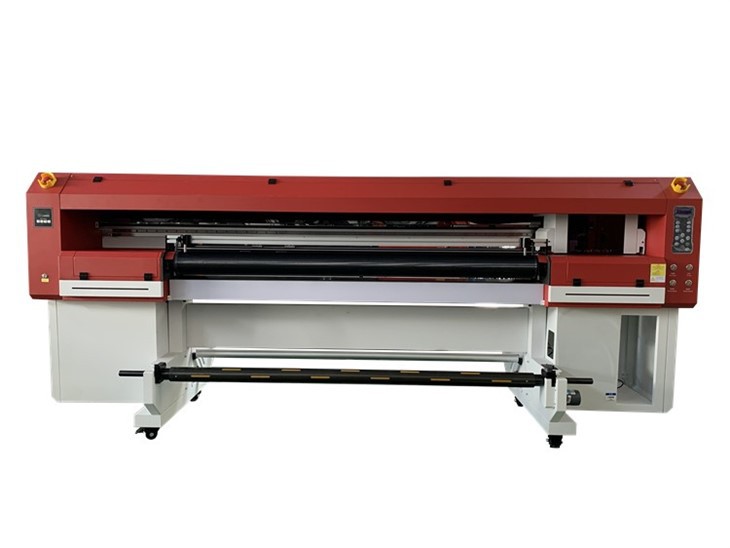
Combination Hybrid UV Printer
A combination hybrid UV printer is a type of printer that combines both flatbed and roll-to-roll printing capabilities. This printer is ideal for flexible and rigid printing applications, including backlit signs, trade show graphics, and retail displays. This printer can handle a wider range of printing materials and can print on both single and double-sided substrates.
Direct-to-Substrate Hybrid UV Printer
A direct-to-substrate hybrid UV printer is a printing machine that can print directly onto a substrate or material without the need for a transfer process. This printer is ideal for printing on a range of surfaces such as wood, ceramic tiles, and metal sheets. The direct-to-substrate feature eliminates the need for printing on transfer sheets, reducing costs and speeding up the printing process.
Parts of Hybrid UV Printer
Print Head
The print head is a critical part of a hybrid UV printer as it is responsible for depositing the ink onto the substrate. These printers use piezoelectric or thermal printhead technology. Piezoelectric technology uses piezoelectric crystals to push ink droplets through a nozzle. Thermal technology, on the other hand, uses heat to create bubbles that force ink droplets to adhere to the substrate.
Ultra Violet Light
UV lamps cure the ink printed on the substrate. The UV light reacts with the ink, causing it to dry instantly. Hybrid UV printers are known for their fast drying times, a feature that is vital to many industries as it increases productivity.
Conveyor System
The conveyor system is an optional but essential component of a hybrid UV printer. It enables the printer to print on long, continuous rolls of substrate that are difficult to handle manually. A conveyor system feeds materials such as paper, vinyl and fabric into the printer, allowing for uninterrupted printing.
Ink System
The ink system is responsible for supplying ink to the printhead. Hybrid UV printers use UV curable inks or solvent-based inks. UV curable ink uses ultraviolet light to cure, causing the ink to dry instantly. In contrast, solvent-based inks use chemical reactions to dry, which results in longer drying times.
Print Size and Versatility
Determine the maximum print size you need and the types of materials it can handle. Consider whether you need the printer to print on rigid substrates, flexible media, or both. Find the size and versatility that suits your specific printing needs.
Print Quality
Evaluate the printer's resolution, color gamut, and overall print quality. Look for a printer that delivers sharp images, vibrant colors, and high-resolution printing. This becomes critical if you are targeting applications such as signage, fine art, or other demanding printing jobs.
Speed and Productivity
Consider the printer's speed and productivity capabilities. Look for features like multi-layer printing, high-speed print modes, and efficient workflow integration. Assess your printer's production capabilities and make sure it can handle your expected workload.
Ink Types and Compatibility
Determine the type of ink your printer uses (UV-curable, solvent-based, or water-based) and evaluate whether it is suitable for your specific application. Check if the printer is compatible with multiple ink types and if it supports special inks such as white or gloss ink.
Maintenance and Support
Consider the printer's maintenance requirements and whether the manufacturer provides support. Look for features like self-cleaning mechanisms, user-friendly interface, and easy-to-use spare parts. Additionally, research the manufacturer's reputation for customer service and technical support.
Cost and Budget
Determine your budget and evaluate the cost of your printer, including maintenance, ink, and supplies. Keep in mind the long-term operating costs associated with your printer. Invest in a printer that balances your budget with the features and functionality you need.
Comments and References
Research reviews and testimonials from existing users of the specific hybrid UV printer model you are considering. Gathering feedback from others who have experience using the printer can provide valuable insights into its reliability, performance, and overall user satisfaction.
How to Use Hybrid UV Printer
Prepare the Printer
Before starting any printer job, it is important to ensure that the printhead is clean and free of clogs. Clean the printhead using a lint-free cloth and alcohol-based cleaning solution. Also, make sure the ink cartridges are full and installed correctly.
Prepare Artwork
Preparing the artwork is crucial to a successful printing job. Create vector-based files using graphic design software such as Adobe Illustrator or CorelDRAW. Files should be the correct size and have a resolution of at least 300 dpi for high-quality printing. It is also important to set the color mode to CMYK because this is the color mode used for printing.
Prepare Substrate
When printing on a substrate, make sure it is clean and free of any dust or debris. If the substrate is uneven, it should be secured using a vacuum table or other clamping mechanism to prevent it from moving during the printing process.
Set Printing Parameters
This includes setting print speed, resolution, ink density and cure time. These settings may vary depending on the substrate and desired print quality. It's important to balance print quality and production speed.
Send Artwork to Printer
After setting the printing parameters, you can send the artwork to the printer. Hybrid UV printers can accept files in various formats such as PDF, EPS, and TIFF. The printer then automatically converts the file into the necessary format and starts the printing process.
Cured Print
After printing, the substrate should go through a curing process, where UV light is used to dry the print and cure the ink. Curing time depends on the ink and substrate used, as well as the printer's UV lamp power.
How to Maintain Hybrid UV Printer
Clean the Printer Regularly
One of the most important things to do in maintaining your hybrid UV printer is to clean it regularly. This means wiping the outside of the printer with a clean, damp cloth and cleaning the printhead with a specialized cleaning solution. It's also important to regularly check the print bed for debris or remaining ink, and to keep the cartridges and ink cartridges free of dust.
Use High Quality Ink
Using high-quality inks is crucial to keeping your hybrid UV printer in good working order. Poor quality or incompatible inks can damage the printhead or cause nozzles to clog, resulting in poor print quality or even printer failure. It's important to source ink specifically designed for your printer and replace the ink cartridges before they dry out completely.
Monitor Temperature and Humidity
Another key factor in maintaining a hybrid UV printer is monitoring the temperature and humidity levels in the printing environment. UV printers are sensitive to changes in these factors, and exposure to extreme temperatures or humidity levels can cause damage to the printhead or other printer components. It is important to keep the printer in a temperature-controlled environment and use a hygrometer to monitor humidity levels and keep them within acceptable limits.
Perform Regular Maintenance Tasks
Performing regular maintenance tasks is another critical aspect of keeping your hybrid UV printer in good working order. This includes tasks such as cleaning the printhead, checking and replacing ink cartridges and cartridges, and calibrating the printer to ensure it prints accurately. Some printers may also require periodic lubrication of moving parts or replacement of certain components, depending on their usage patterns and design specifications.
Signage and Graphic Printing
Hybrid UV printers are often used to create eye-catching signs, banners, posters and other displays. Able to print on a variety of substrates including vinyl, corrugated plastic, foam board, metal, and acrylic, these printers make it easy to create durable, high-quality signage and graphics.
Packaging and Printing
Hybrid UV printers are also widely used in the packaging industry. They can be printed on a variety of packaging materials including cardboard, corrugated board and plastic containers, providing design flexibility to brand owners and packagers. With the ability to print variable data and short print runs, hybrid UV printers enable the personalization of packaging designs.
Indoor Decorations
Hybrid UV printers can print directly on a range of materials used for interior decoration, including tiles, glass, wood and metal. The process eliminates the need for traditional printing and installation methods, making it a more economical and efficient option for interior decorators. Hybrid UV printers are also popular for printing wallpapers and murals.
Promotional Products
Hybrid UV printers can print a range of promotional products such as pens, mugs and T-shirts. The UV ink technology used enables bright and durable prints on a variety of substrates, ideal for customized promotional products.
Certificate

Frequently Asked Questions
Q: What is a Hybrid UV Printer?
Q: How does a Hybrid UV Printer work?
Q: What kind of materials can a Hybrid UV Printer print on?
Q: Are there any limitations to what a Hybrid UV Printer can print on?
Q: What are the benefits of using a Hybrid UV Printer?
Q: Can a Hybrid UV Printer print high-quality images and text?
Q: What is the resolution of a Hybrid UV Printer?
Q: How does a Hybrid UV Printer compare to other types of printers?
Q: What are the maintenance requirements of a Hybrid UV Printer?
Q: Can a Hybrid UV Printer print on transparent materials?
Q: What is the maximum size of the print area on a Hybrid UV Printer?
Q: How fast can a Hybrid UV Printer produce prints?
Q: Are there any environmental concerns when using a Hybrid UV Printer?
Q: What kind of ink is used in a Hybrid UV Printer?
Q: How long do the prints from a Hybrid UV Printer last?
Q: What kind of software is needed to operate a Hybrid UV Printer?
Q: Is it possible to print in multiple colors with a Hybrid UV Printer?
Q: How expensive is a Hybrid UV Printer compared to other printing technologies?
Q: How easy is it to operate a Hybrid UV Printer?
Q: Can a Hybrid UV Printer print on curved surfaces?
As one of the leading hybrid UV printer suppliers in China, we warmly welcome you to buy high-grade hybrid UV printer for sale here from our factory. All our products are with high quality and competitive price. Contact us for more details.
best uv printer for phone cases, best chinese uv printer, hybrid printing machine