

When it comes to using a Flag Printer, safety precautions are of utmost importance. As a supplier of high - quality Flag Printers, I am well - aware of the potential risks involved in operating these machines and the necessary steps to ensure a safe working environment. In this blog, I will share some essential safety precautions that users should take when using a Flag Printer.
1. Read the Manual Thoroughly
Before you even start using the Flag Printer, the first and most crucial step is to read the user manual provided with the machine. The manual contains detailed information about the printer's features, operation procedures, and safety instructions. It will guide you on how to set up the printer correctly, load the media, and use the various functions. Ignoring the manual can lead to improper use of the printer, which may result in accidents or damage to the machine. For example, incorrect media loading can cause jams, and using the wrong type of ink can affect the print quality and may even damage the printer's internal components.
2. Wear Appropriate Personal Protective Equipment (PPE)
When operating a Flag Printer, wearing the right PPE is essential to protect yourself from potential hazards. Here are some types of PPE that you should consider:
- Gloves: Printing inks can be harmful to your skin. Some inks contain chemicals that may cause irritation, allergic reactions, or even more serious health problems over time. Wearing chemical - resistant gloves can prevent direct contact between your skin and the ink. For instance, if you need to handle the ink cartridges or clean up any ink spills, gloves will act as a barrier.
- Safety Glasses: During the printing process, there is a risk of ink splashing or small particles being released into the air. Safety glasses can protect your eyes from these potential hazards. If ink gets into your eyes, it can cause severe irritation and may even lead to vision problems.
- Respirators: If the Flag Printer uses inks that emit strong fumes, wearing a respirator is necessary. Some inks, especially solvent - based inks, can release volatile organic compounds (VOCs) into the air. Inhaling these fumes for an extended period can cause respiratory problems, headaches, and other health issues. A respirator can filter out these harmful fumes and protect your lungs.
3. Ensure a Proper Working Environment
The working environment where the Flag Printer is located plays a significant role in ensuring safety. Here are some factors to consider:
- Ventilation: Adequate ventilation is crucial, especially if the printer uses inks that emit fumes. A well - ventilated area will help to disperse the fumes and reduce the concentration of harmful chemicals in the air. You can install exhaust fans or open windows to improve air circulation. For example, in a small printing workshop, a ventilation system can be set up to draw the fumes out of the room.
- Temperature and Humidity: Flag Printers, like Roll To Roll Digital Printer and Roll To Roll UV Printer, are sensitive to temperature and humidity. Extreme temperatures can affect the performance of the printer and the quality of the prints. High humidity can cause the media to absorb moisture, leading to printing defects. It is recommended to maintain the temperature between 20 - 25 degrees Celsius and the humidity between 40 - 60%.
- Cleanliness: Keep the work area clean and free of clutter. A messy workspace can increase the risk of accidents, such as tripping over cables or knocking over the printer. Regularly clean the printer to remove dust, ink residues, and other debris. This will not only ensure the safety of the operator but also extend the lifespan of the printer.
4. Electrical Safety
Flag Printers are electrical devices, and electrical safety is of utmost importance. Here are some electrical safety precautions:
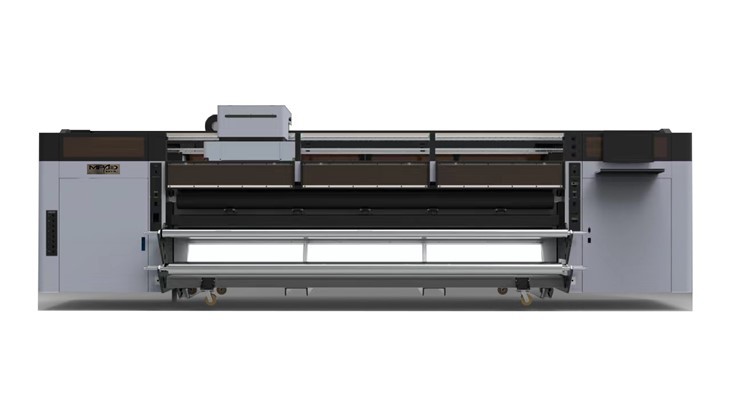
- Proper Grounding: Ensure that the printer is properly grounded. A grounded printer reduces the risk of electrical shock in case of a short circuit or electrical fault. You should always plug the printer into a grounded electrical outlet.
- Inspect Cables Regularly: Check the power cables and other electrical connections for any signs of damage, such as fraying or exposed wires. Damaged cables can pose a serious electrical hazard. If you notice any damage, replace the cables immediately.
- Avoid Overloading Circuits: Do not plug too many electrical devices into the same circuit as the Flag Printer. Overloading a circuit can cause overheating, which may lead to a fire. Make sure to use a dedicated circuit for the printer or distribute the electrical load evenly.
5. Maintenance and Inspection
Regular maintenance and inspection of the Flag Printer are essential for its safe and efficient operation.
- Follow the Maintenance Schedule: The user manual will provide a maintenance schedule for the printer. This may include tasks such as cleaning the print heads, replacing the ink cartridges, and lubricating moving parts. Following the maintenance schedule will ensure that the printer is in good working condition and reduce the risk of breakdowns and accidents.
- Inspect for Wear and Tear: Regularly inspect the printer for any signs of wear and tear. Check the belts, rollers, and other mechanical components for damage or excessive wear. Replace any worn - out parts promptly to prevent further damage to the printer and to ensure safe operation.
6. Training and Supervision
If you have multiple operators using the Flag Printer, providing proper training is essential. All operators should be trained on how to use the printer safely and correctly. The training should cover topics such as machine operation, safety procedures, and emergency response.
- On - the - Job Training: New operators should receive on - the - job training from experienced operators or technicians. This hands - on training will allow them to learn the practical aspects of using the printer and gain confidence in their skills.
- Supervision: Ensure that there is proper supervision, especially for new operators. A supervisor can monitor the operators' actions, provide guidance, and correct any unsafe practices.
7. Emergency Preparedness
Despite taking all the necessary safety precautions, emergencies can still occur. It is important to be prepared for such situations.
- Emergency Stop Button: Familiarize yourself with the location of the emergency stop button on the Flag Printer. In case of an emergency, such as a fire or a mechanical malfunction, you can quickly press the emergency stop button to shut down the printer.
- First - Aid Kit: Keep a first - aid kit in the working area. In case of minor injuries, such as cuts or burns, the first - aid kit can be used to provide immediate treatment.
- Fire Extinguisher: Have a fire extinguisher nearby. Make sure that all operators know how to use the fire extinguisher in case of a fire.
In conclusion, using a Flag Printer can be a safe and rewarding experience if you follow these safety precautions. As a supplier of Flag Printer, I am committed to providing high - quality printers and ensuring that our customers are well - informed about the safety aspects of using our products. If you are interested in purchasing a Flag Printer or have any questions about safety or operation, please feel free to contact us for further discussion and potential procurement.
References
- General safety guidelines for industrial printing equipment.
- Manufacturer's user manual for Flag Printers.