

Hey there! As a supplier of 2513 UV printers, I often get asked about the heat dissipation performance of these machines. It's a crucial aspect, especially for those who plan to use the printer for extended periods or in high - volume production. So, let's dive right in and take a detailed look at it.
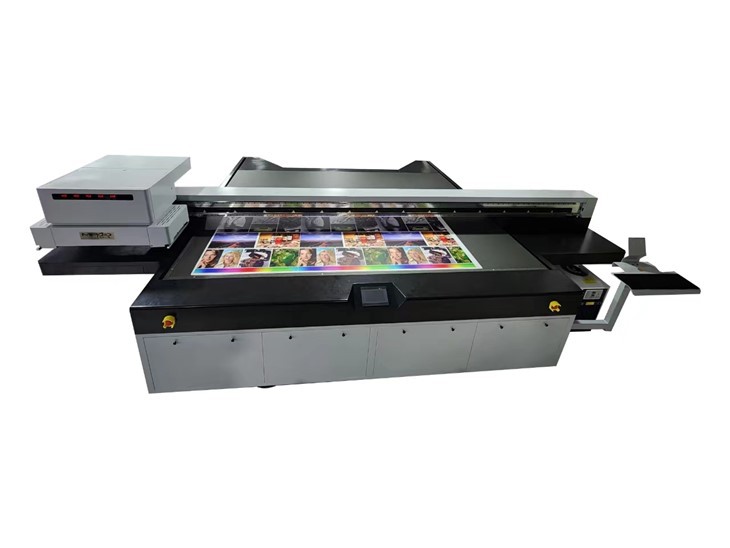
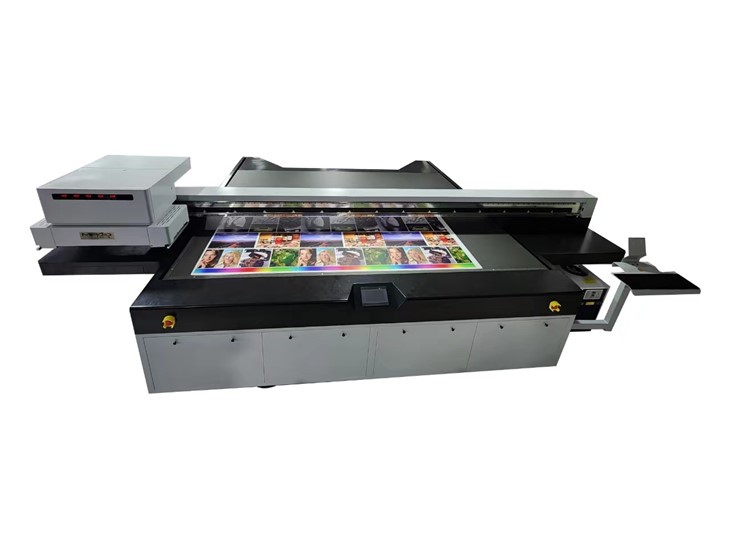
First off, what exactly is a 2513 UV printer? Well, the "2513" refers to the printing area, which is 2500mm in length and 1300mm in width. This size makes it a popular choice for a wide range of applications, from printing on small promotional items to large - scale signage. And when it comes to UV printers, heat management is no joke.
Why is Heat Dissipation Important in UV Printers?
UV printers work by using ultraviolet light to cure the ink instantly as it's printed onto the surface. During this process, a significant amount of heat is generated. There are multiple heat sources within the printer. The UV lamps, which are essential for the curing process, can get extremely hot. The printheads also produce heat when they're in operation, especially if they're firing ink at a high frequency.
If the heat isn't properly dissipated, it can lead to a whole bunch of problems. For starters, excessive heat can damage the sensitive components inside the printer. The printheads might get overheated, which can cause clogging and uneven ink distribution. This, in turn, will affect the print quality, resulting in blurry or streaky prints. The UV lamps can also lose their efficiency if they're exposed to high temperatures for too long, which means the ink won't cure properly, and the prints won't have the desired durability.
Heat Dissipation Mechanisms in 2513 UV Printers
Air Cooling
Most 2513 UV printers come equipped with air - cooling systems. These systems use fans to blow air over the hot components, carrying away the heat. The fans are strategically placed near the UV lamps and the printheads. For example, there are usually fans on the sides of the UV lamp housings. As the hot air rises, the fans suck in cooler air from the surroundings and blow it across the lamps, keeping them at a reasonable temperature.
The advantage of air cooling is that it's relatively simple and cost - effective. It doesn't require any additional fluids or complex plumbing systems. However, air cooling has its limitations. In a high - humidity environment or in a hot workshop, the air might already be warm, which reduces the efficiency of the cooling system. Also, if the printer is running continuously for a long time, the air - cooling system might struggle to keep up with the heat generation.
Water Cooling
Some high - end 2513 UV printers use water - cooling systems. Water has a much higher heat capacity than air, which means it can absorb more heat. In a water - cooling system, a pump circulates water through a series of pipes that are in contact with the hot components. The water absorbs the heat and then flows to a radiator, where it's cooled down by a fan before being recirculated.
Water cooling is more efficient than air cooling, especially for heavy - duty printing jobs. It can maintain a more stable temperature, which is great for the longevity of the printer's components. But it also comes with some drawbacks. Water - cooling systems are more complex and expensive to install and maintain. There's also a risk of leaks, which can damage the printer if not detected and fixed promptly.
Factors Affecting Heat Dissipation Performance
Ambient Temperature
The temperature of the environment where the printer is located plays a big role in heat dissipation. If the workshop is very hot, the cooling systems have to work harder to dissipate the heat. For example, in a summer workshop where the ambient temperature is above 30°C, the air - cooling system might not be able to cool the components as effectively as it would in a cooler environment.
Printing Speed and Frequency
The faster the printer prints and the more frequently it operates, the more heat it generates. If you're running continuous high - speed printing jobs, the heat generation rate will be much higher than if you're doing occasional, slow - speed prints. This means that the cooling systems need to be able to handle the increased heat load.
Printer Design
The design of the printer also affects heat dissipation. A well - designed printer will have proper ventilation channels that allow hot air to escape easily. The placement of components is also crucial. If the components are too close together, the heat can build up in certain areas, making it harder for the cooling systems to work effectively.
How to Improve Heat Dissipation Performance
Keep the Printer in a Cool Environment
Try to place the printer in a well - ventilated room with a controlled temperature. You can use air - conditioning or fans to keep the ambient temperature down. This will make it easier for the printer's cooling systems to do their job.
Regular Maintenance
Regularly clean the fans and air filters in the printer. Dust and debris can accumulate on these components, reducing their efficiency. If you have a water - cooling system, check for leaks and make sure the water level is adequate. Replace the water at regular intervals to prevent the growth of algae and bacteria.
Optimize Printing Settings
Don't always run the printer at its maximum speed. If possible, adjust the printing speed and frequency according to the job requirements. This will reduce the heat generation and give the cooling systems a chance to keep up.
Conclusion
The heat dissipation performance of a 2513 UV printer is a critical factor that can significantly impact its performance and lifespan. Whether it's an air - cooling or water - cooling system, understanding how the heat is managed in the printer is essential for getting the best results. By taking proper care of the printer and ensuring that the heat dissipation systems are working efficiently, you can avoid a lot of potential problems and enjoy high - quality prints for a long time.
If you're interested in our 2513 UV printers or want to learn more about their heat dissipation performance, feel free to reach out to us. We'd be more than happy to discuss your specific needs and help you make the right choice. You can also check out our other printer models like the Small Format UV Printer, Large Format UV Flatbed Printer, and Wide Format Flatbed Printer.
References
- Industry reports on UV printer technology
- Manufacturer's specifications for 2513 UV printers