

As a supplier of Digital UV Printers, I'm excited to share with you the inner workings of these remarkable machines. Digital UV Printers have revolutionized the printing industry, offering high - quality, versatile, and efficient printing solutions for a wide range of applications. In this blog, we'll take a deep dive into how a Digital UV Printer works.
The Basics of Digital UV Printing
Digital UV printing is a modern printing technology that uses ultraviolet (UV) light to cure or dry the ink immediately after it is applied to the printing surface. This is in contrast to traditional printing methods, where the ink takes time to dry through evaporation or absorption into the substrate.
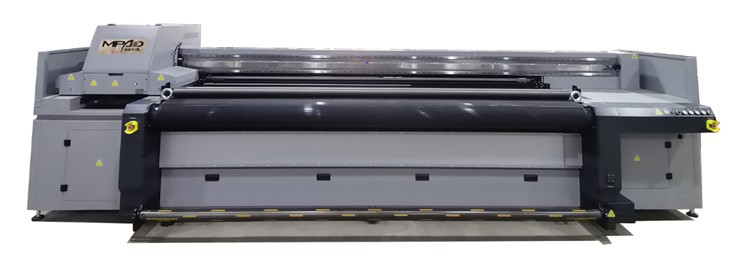
The key components of a Digital UV Printer include a print head, UV lamps, a conveyor system (in some models), and a control unit. Each of these components plays a crucial role in the printing process.
The Print Head: The Heart of the Printer
The print head is the most important part of a Digital UV Printer. It is responsible for depositing the ink onto the substrate. There are different types of print heads used in Digital UV Printers, such as piezoelectric and thermal print heads.
Piezoelectric print heads are the most common type in high - end Digital UV Printers. They work by using piezoelectric crystals. When an electric current is applied to these crystals, they change shape, which forces the ink out of the nozzles in the print head. This method allows for precise control of the ink droplets, resulting in high - resolution prints.
Thermal print heads, on the other hand, use heat to create bubbles in the ink. When the bubbles expand, they push the ink out of the nozzles. While thermal print heads are generally less expensive, they may not offer the same level of precision as piezoelectric print heads.
The print head moves across the substrate in a controlled manner, following the pattern that is programmed into the printer's software. It can deposit multiple layers of ink to create vivid colors and detailed images.
Ink and Color Management
Digital UV Printers use special UV - curable inks. These inks are formulated to dry quickly when exposed to UV light. They are available in a wide range of colors, including CMYK (cyan, magenta, yellow, and black) as well as additional spot colors.
Color management is a critical aspect of the printing process. The printer's software uses color profiles to ensure that the colors printed on the substrate match the colors in the original digital image as closely as possible. This involves calibrating the printer regularly and adjusting the ink flow for each color channel.
Before printing, the digital image is first rasterized, which means it is converted into a series of dots that the printer can understand. The printer then uses this rasterized image to determine where to deposit the ink on the substrate.
UV Curing Process
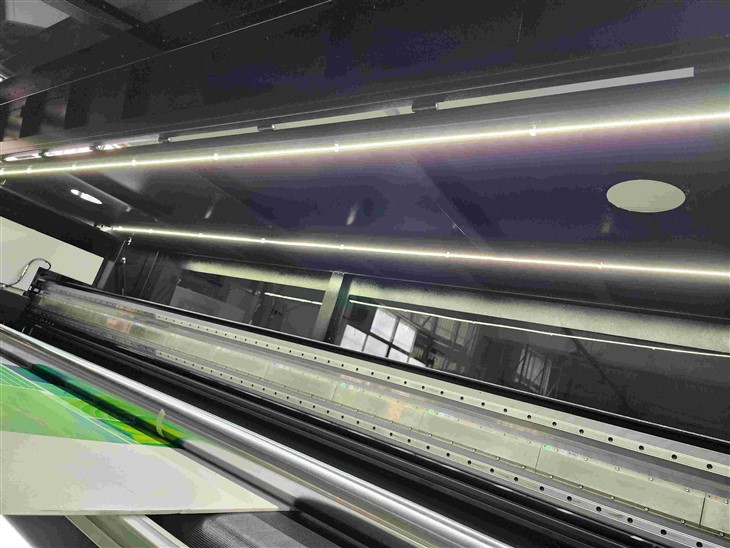
Once the ink is deposited on the substrate, it needs to be cured or dried. This is where the UV lamps come into play. UV lamps emit ultraviolet light, which causes a chemical reaction in the UV - curable ink. This reaction makes the ink harden and adhere to the substrate almost instantly.
There are different types of UV lamps used in Digital UV Printers, such as mercury vapor lamps and LED UV lamps. LED UV lamps are becoming increasingly popular because they are more energy - efficient, have a longer lifespan, and generate less heat compared to mercury vapor lamps.
The UV curing process is crucial for the quality of the print. If the ink is not cured properly, it may smudge, scratch easily, or not adhere well to the substrate. The intensity and duration of the UV light exposure are carefully controlled to ensure optimal curing.
Substrate Compatibility
One of the advantages of Digital UV Printers is their ability to print on a wide variety of substrates. These include rigid materials such as wood, metal, glass, and plastic, as well as flexible materials like vinyl, fabric, and paper.
However, different substrates may require different printing settings. For example, porous substrates may absorb more ink, while non - porous substrates may require a special primer to ensure good ink adhesion. The printer's software allows users to adjust the printing parameters, such as ink density and curing time, depending on the type of substrate being used.
Conveyor System and Flatbed Printing
Some Digital UV Printers are equipped with a conveyor system, which is used for printing on long or continuous substrates. The substrate is fed through the printer on the conveyor belt, and the print head moves back and forth across it. This allows for high - speed, continuous printing.
On the other hand, flatbed Digital UV Printers are designed for printing on flat, rigid substrates. The substrate is placed on a flatbed, and the print head moves over it to deposit the ink. Flatbed printers offer more flexibility in terms of the size and shape of the substrates that can be printed on.
If you're interested in a printer that combines the features of both flatbed and conveyor - based printers, you might want to check out our Hybrid Flatbed Printers. These printers are capable of printing on both flat and curved surfaces, offering even more versatility. Our Hybrid Printing Machine and Versatile UV Hybrid Printer are also excellent options for those looking for a comprehensive printing solution.
Control Unit and Software
The control unit is the brain of the Digital UV Printer. It manages all the functions of the printer, including the movement of the print head, the operation of the UV lamps, and the conveyor system (if applicable). The control unit is connected to a computer, where the user can input the printing job and adjust the settings.
The printer's software is also an important part of the system. It allows users to design and edit the digital images, set the printing parameters, and monitor the printing process. Advanced software features may include job queuing, color management, and print preview.
Quality Control and Maintenance
To ensure consistent print quality, regular maintenance of the Digital UV Printer is essential. This includes cleaning the print head to prevent clogging, checking the UV lamps for proper operation, and calibrating the printer regularly.
Quality control measures are also in place during the printing process. The printer may have sensors that detect issues such as low ink levels, misaligned print heads, or improper curing. These sensors can alert the user to take corrective action before the print quality is affected.
Applications of Digital UV Printers
Digital UV Printers have a wide range of applications in various industries. In the advertising industry, they are used to print large - format banners, signs, and posters. In the manufacturing industry, they can be used to print labels, product markings, and decorative elements on various products.
In the art and design field, Digital UV Printers allow artists to reproduce their works on different substrates, creating unique and high - quality art pieces. They are also used in the packaging industry to print custom - designed packaging materials.
Conclusion
In conclusion, Digital UV Printers are complex and sophisticated machines that combine advanced technology and precision engineering to produce high - quality prints on a wide variety of substrates. Understanding how they work can help you make the most of these printers and choose the right one for your specific needs.
If you're interested in purchasing a Digital UV Printer for your business, we'd be happy to discuss your requirements and provide you with a tailored solution. Whether you need a Hybrid Flatbed Printer, a Hybrid Printing Machine, or a Versatile UV Hybrid Printer, our team of experts is here to assist you. Contact us today to start the procurement and negotiation process.
References
- “Principles of Digital Printing Technology” by John C. Wyble
- “UV Curing: Science and Technology” by Dr. Charles E. Hoyle and Dr. Christopher N. Bowman
- Industry whitepapers on Digital UV Printing technology