

In the dynamic landscape of printing technology, hybrid printers have emerged as a revolutionary solution, offering unparalleled versatility and efficiency. As a leading Hybrid Printer supplier, we understand the intricate components that make these machines so remarkable. One such crucial element is the controller, which plays a pivotal role in the overall performance and functionality of a hybrid printer. In this blog post, we will delve into the world of hybrid printer controllers, exploring their functions, importance, and the impact they have on the printing process.
Understanding Hybrid Printers
Before we dive into the role of the controller, let's first understand what hybrid printers are. Hybrid printers combine the capabilities of both flatbed and roll-to-roll printing, allowing users to print on a wide range of substrates, including rigid materials like wood, glass, and metal, as well as flexible materials such as vinyl, fabric, and paper. This versatility makes hybrid printers ideal for a variety of applications, from signage and advertising to packaging and industrial printing.
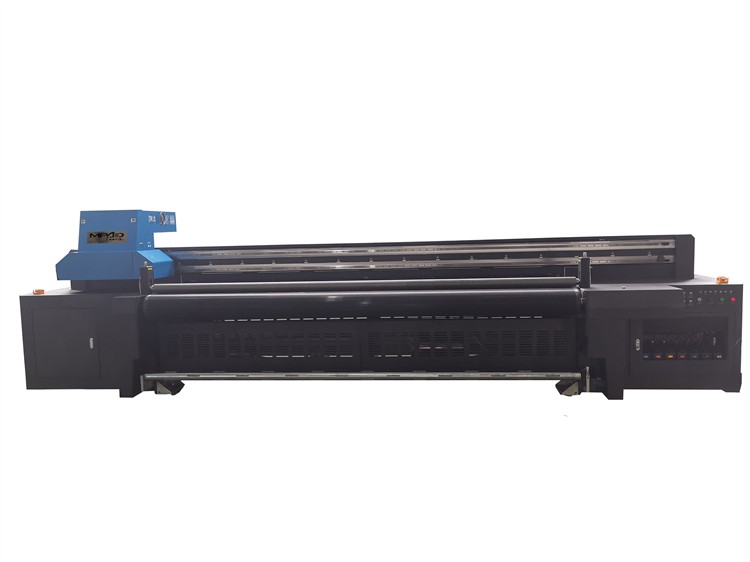
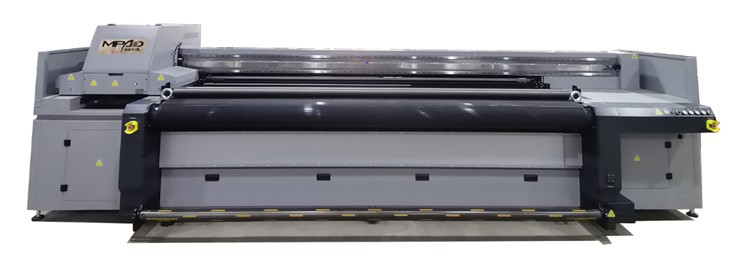
Our company offers a range of hybrid printers, including Hybrid Flatbed Printers, LED Flatbed UV Printer, and UV Hybrid Printer Flatbed. These printers are equipped with advanced features and technologies to ensure high-quality, precise, and efficient printing.
The Role of the Controller in a Hybrid Printer
The controller is the brain of a hybrid printer, responsible for managing and coordinating all the functions of the machine. It acts as an interface between the user and the printer, translating the user's commands into actions that the printer can understand and execute. Here are some of the key roles of the controller in a hybrid printer:
1. Print Job Management
The controller is responsible for managing print jobs from start to finish. It receives print files from the user's computer, processes them, and prepares them for printing. This includes tasks such as rasterizing the print file, adjusting the color settings, and optimizing the print layout. The controller also manages the queue of print jobs, ensuring that they are printed in the correct order and that the printer is used efficiently.
2. Motion Control
One of the most critical functions of the controller is to control the motion of the print head and the substrate. The controller sends signals to the motors that drive the print head and the substrate, ensuring that they move in a precise and coordinated manner. This is essential for achieving accurate and consistent printing results, especially when printing on large or irregularly shaped substrates.
3. Ink Delivery and Management
The controller also plays a crucial role in managing the ink delivery system of the printer. It controls the flow of ink from the ink cartridges to the print head, ensuring that the correct amount of ink is applied to the substrate at the right time. The controller also monitors the ink levels in the cartridges and alerts the user when it's time to replace them. Additionally, it can perform functions such as ink circulation and degassing to ensure the quality and consistency of the ink.
4. Color Management
Color accuracy is essential in printing, especially for applications such as signage and advertising. The controller is responsible for managing the color settings of the printer, ensuring that the colors in the print file are reproduced accurately on the substrate. This involves tasks such as color profiling, color calibration, and color correction. The controller uses advanced algorithms and color management techniques to ensure that the printed colors match the original design as closely as possible.
5. User Interface and Control
The controller provides a user interface that allows the user to interact with the printer. This interface can be a touchscreen display, a control panel, or a software application. Through the user interface, the user can perform tasks such as selecting print jobs, adjusting print settings, monitoring the printer's status, and troubleshooting issues. The controller also provides feedback to the user, such as error messages and status updates, to ensure that the printing process runs smoothly.
Importance of a High-Quality Controller
A high-quality controller is essential for the optimal performance of a hybrid printer. Here are some of the reasons why:
1. Print Quality
A good controller ensures that the printer can produce high-quality prints with accurate colors, sharp details, and smooth gradients. It can handle complex print jobs and optimize the printing process to achieve the best possible results.
2. Efficiency and Productivity
An efficient controller can manage print jobs quickly and efficiently, reducing the time and cost of printing. It can also optimize the use of resources, such as ink and substrate, to minimize waste and increase productivity.
3. Reliability and Stability
A reliable controller ensures that the printer operates smoothly and consistently, without frequent breakdowns or errors. It can handle a wide range of print jobs and substrates, and it can adapt to different printing conditions to ensure reliable performance.
4. Ease of Use
A user-friendly controller makes it easy for the user to operate the printer and perform tasks such as setting up print jobs, adjusting print settings, and troubleshooting issues. This reduces the learning curve and increases the productivity of the user.
Our Company's Approach to Controller Technology
As a leading Hybrid Printer supplier, we are committed to providing our customers with the latest and most advanced controller technology. Our printers are equipped with state-of-the-art controllers that offer a range of features and benefits, including:
1. Advanced Print Job Management
Our controllers use advanced algorithms and software to manage print jobs efficiently, ensuring that they are printed quickly and accurately. They can handle large print files and complex print jobs, and they can optimize the printing process to achieve the best possible results.
2. Precise Motion Control
Our controllers use high-precision motors and sensors to control the motion of the print head and the substrate, ensuring that they move in a precise and coordinated manner. This results in accurate and consistent printing results, even on large or irregularly shaped substrates.
3. Intelligent Ink Management
Our controllers are equipped with intelligent ink management systems that can monitor the ink levels in the cartridges, control the flow of ink to the print head, and perform functions such as ink circulation and degassing. This ensures the quality and consistency of the ink, and it reduces the risk of clogging and other ink-related issues.
4. Advanced Color Management
Our controllers use advanced color management techniques to ensure that the colors in the print file are reproduced accurately on the substrate. They can perform tasks such as color profiling, color calibration, and color correction, and they can adapt to different substrates and printing conditions to achieve the best possible color accuracy.
5. User-Friendly Interface
Our controllers are designed with a user-friendly interface that makes it easy for the user to operate the printer and perform tasks such as setting up print jobs, adjusting print settings, and troubleshooting issues. The interface is intuitive and easy to navigate, and it provides clear feedback to the user.
Contact Us for Your Hybrid Printer Needs
If you are interested in learning more about our hybrid printers and the role of the controller in these machines, or if you have any questions or need assistance with your printing needs, please contact us. Our team of experts is available to provide you with detailed information, answer your questions, and help you choose the right printer for your application. We look forward to working with you and helping you achieve your printing goals.