

MPA Digital Technology : Your Trustworthy Digital UV Printer Supplier!
MPA Digital Technology Co., Ltd. (hereinafter referred to as MPAD) was established in 2012 and is composed of experts dedicated to the research and development of digital large-format printers. MPAD has an independent R&D team with rich experience and knowledge in large-format printer design, especially complete control systems for UV flatbed printers and UV roll-to-roll printers, allowing us to provide customers with stable and exciting products and continuous technological innovation.
Rich Products
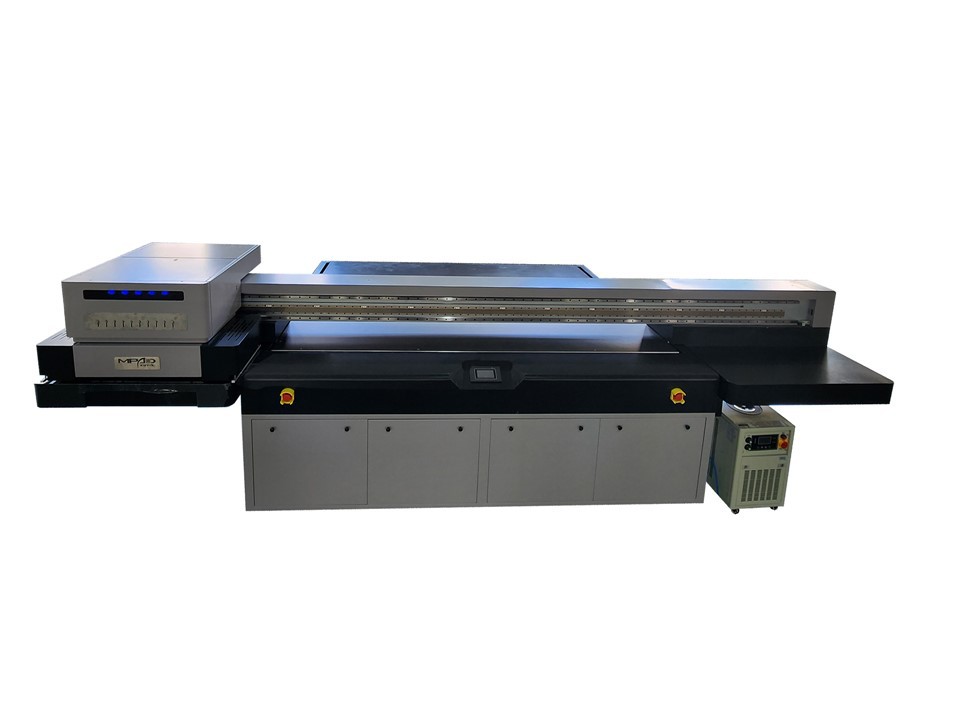
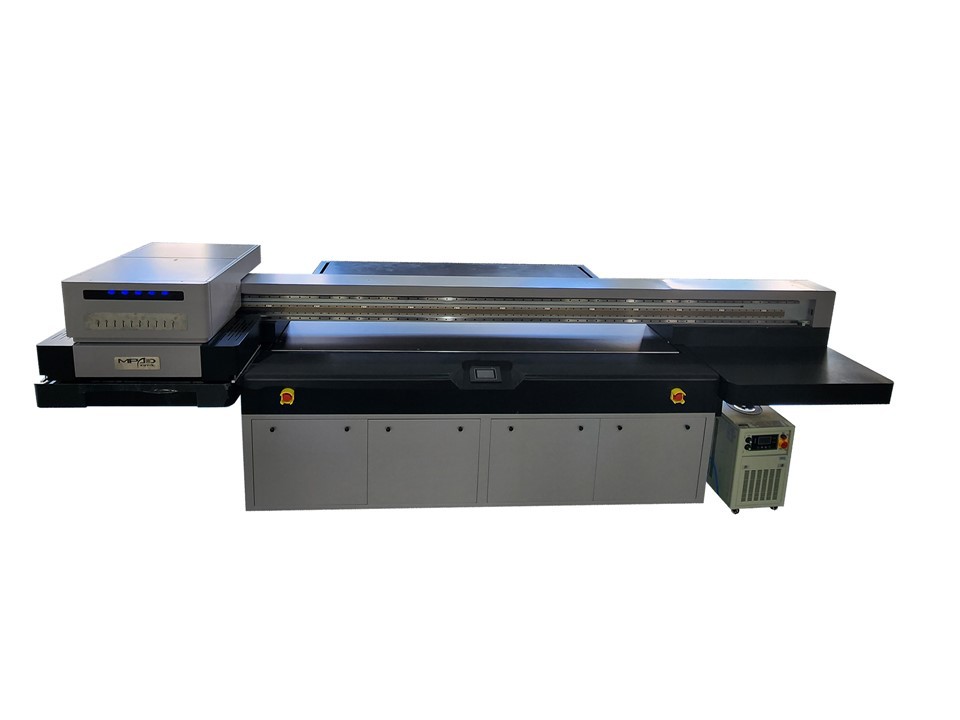
We can produce UV printers, UV flatbed printers, UV roll printers, hybrid UV printers, single-channel inkjet printers, digital UV flatbed printers, high-speed UV printers, UV printer flatbed printers, and more.
Products Widely Used
The products we produce can be widely used in signage and graphics, interior decoration, textiles and apparel, outdoor advertising, labels and packaging, promotional products, fine art reproductions, architectural graphics and more.
Many Partners
We have customers and partners in many countries, including the United States, United Kingdom, Spain, Greece, Poland, Russia, India, Turkey, Kazakhstan, Singapore, Israel, United Arab Emirates, Algeria, etc.
Customizable
Our team has 10 years of professional R&D and production experience in the field of digital large-format printer product R&D and is able to meet the needs of different markets and customers.

A UV inkjet printer is a type of digital printing technology that uses ultraviolet (UV) curable inks to print images on a variety of materials, including paper, plastic, wood, metal, and glass. UV inkjet printers use a UV lamp or LED light to cure the ink immediately after it is printed, creating a durable and scratch-resistant finish. They are commonly used for printing high-quality graphics, labels, packaging, signage, and promotional materials. UV inkjet printing is popular for its ability to print on a wide range of materials, its fast drying time, and its high-quality output.

UV Printer Golf Balls refers to a printing technology that uses a UV printer to print designs or logos onto golf balls. The process involves using UV light to cure an ink, resulting in a durable, long-lasting print that resists fading, scratching, and chipping. This technology allows for high-quality prints on individual golf balls, making them ideal for personalization or branding purposes for golf tournaments, events, or gifts.

A high speed UV printer (UV LED printer) is a type of digital printer that uses ultraviolet (UV) light to cure or harden specially formulated ink on various materials such as paper, plastic, glass, metal, and fabric. This curing process enables the printer to produce extremely high-quality prints that are resistant to smudging, scratching, and fading. Additionally, high speed UV printers can print much faster than their traditional counterparts, making them ideal for high-volume commercial applications like signage, packaging, and marketing materials. They also do not emit volatile organic compounds (VOCs) and are considered to be environmentally friendly.

A UV printer flatbed is a type of printer that is capable of printing on a wide range of materials, such as plastic, glass, metal, and wood. It uses UV-curable ink that is cured by ultraviolet (UV) light, hence the name "UV printer". The printer has a flatbed surface onto which the materials are placed, and the ink is jetted onto the surface by the printer's print heads. UV printer flatbeds are often used for printing signs, banners, posters, and other large format graphics.
A digital flatbed printer is a printing machine that uses a flat surface to print digital images onto a variety of materials, such as paper, metal, plastic, fabric, and wood. The image is created on a computer and transferred to the printer, which prints the image onto the material using inkjet or other digital printing technologies. The printer can print any combination of colors, allowing for full-color photographic prints and graphics. Digital flatbed printers are commonly used for printing signs, banners, promotional materials, and custom products.
A flatbed printer is a type of printer that can print on a range of flat materials, including paper, wood, plastic, metal, glass, and more. The flatbed printer works by laying the material on a flat surface, and then the printer head moves across the surface, printing onto the material. Flatbed printers are commonly used in the printing industry for producing signs, posters, banners, and other large format graphics. They offer high-quality printing and can print large quantities of material quickly and efficiently.

A UV printing machine is a printer that uses ultraviolet (UV) light to dry or cure ink as it is printed onto a substrate. Unlike traditional inkjet and laser printers, which generally use solvent-based or water-based inks that evaporate and are absorbed into the substrate, UV printing inks are exposed to UV light as they are printed, which quickly solidifies them into a high-quality, durable and vibrant image. UV printing is typically used for high-quality printing of paper, plastics, metal, glass, and other materials.
A printer UV flatbed is a type of digital printing machine that uses UV (ultraviolet) light to cure or dry ink directly onto various types of flat materials. It can print on a range of surfaces, including glass, metal, plastic, wood, and more, making it versatile for different applications such as signage, promotional displays, and product packaging. The use of UV ink and curing allows for high-quality, durable prints that are resistant to fading, scratching, and water damage. The flatbed design allows for printing on thicker and larger sheets of material, eliminating the need for traditional printing processes like screen printing or offset printing.

A UV printer is a type of digital inkjet printer that uses ultraviolet light to cure ink as it is printed onto various materials such as paper, plastics, leather, wood, glass, and metal. This curing process allows the ink to adhere to the surface of the material, creating vibrant colors and high-quality, detailed images. UV printers are commonly used in industries such as signage, packaging, and promotional products. They offer high speed, high-quality printing, and the ability to print on a wide range of materials, making them a versatile and efficient choice for printing businesses.
A digital UV printer is a type of printer that uses ultraviolet (UV) light to dry and cure the ink as it is printed onto a surface. This allows the ink to adhere to a wider variety of materials, including plastic, glass, metal, wood, and more. The printer uses a flatbed or roll-to-roll system to hold the material that is being printed on and uses computer software to control the printing process. The ink used in digital UV printing is often more durable and more resistant to fading and scratching than traditional ink. This makes UV printing suitable for a wide range of applications, from signage and posters to packaging and textiles.
Features of Digital UV Printer
Wide Substrate Compatibility
Digital UV Printer can print on a variety of porous and non-porous materials, including paper, plastic, metal, glass, canvas, and leather.
Full Color Availability
Digital UV Printer do not pose limits on color options. Gradients and expressions that traverse the entire color spectrum are available for use.
Environmentally-Friendly Properties
The parts and ink used by digital UV printers possess certain properties that make them more environmentally friendly than many printer alternatives. For one, their LED curing bulbs don't contain mercury, making them easy to dispose of once they need to be replaced. Additionally, as part of the ink portfolio used by UV printers does not release volatile compounds into the air during operation, harmful emissions are minimized.
Print Items of Various Shapes
Digital UV printers can print directly on the surface of objects without preprocessing. This means you can print items of all shapes and sizes without being limited by the 1200dpi resolution.
Piezoelectric Inkjet Printer
Piezoelectric inkjet printers use piezoelectric technology to produce high-quality prints. The printhead contains tiny piezoelectric crystals that vibrate when an electric current passes through them, forcing ink droplets to land on the substrate. These printers offer high precision and can print on a variety of materials, from paper to metal and plastic.
Thermal Inkjet Printer
Thermal inkjet printers use a heating element to create small bubbles in the ink, forcing the ink through the print head and onto the substrate. Thermal inkjet printers are known for their speed and affordability, making them a popular choice for small and medium-sized businesses.
Flatbed Printer
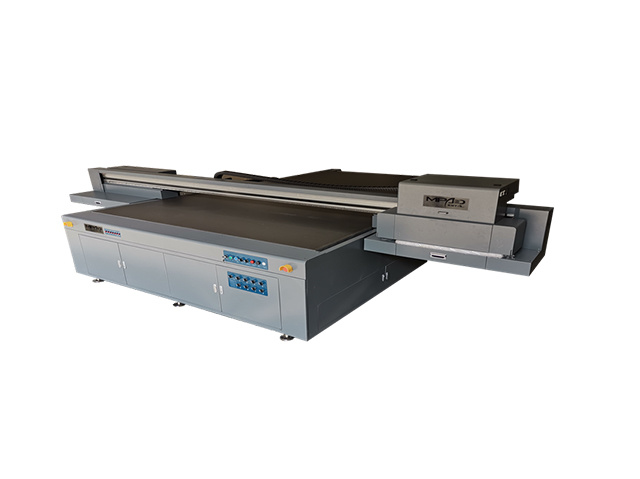
Flatbed digital UV printers are designed to print directly on flat or slightly curved surfaces, such as plywood or aluminum panels. These printers have a flat print bed on which the substrate is placed, and the print head moves back and forth to deposit ink onto the material.
Roll-to-Roll Printer
Roll-to-roll digital UV printers are designed to process continuous rolls of flexible materials such as vinyl, fabric or paper. The printing process begins by feeding the material into the printer and then winding it onto the take-up tray after printing is complete. These printers are often used to create large format banners and billboards.
Hybrid Printer
Hybrid digital UV printers combine the capabilities of flatbed and roll-to-roll printers and can print on both flat and curved substrates. These printers are versatile and can handle a wide range of materials from rigid sheets to flexible films.
Benefits of Using Digital UV Printer
Exceptional Print Quality
Digital UV Printer delivers stunning, photorealistic prints with sharp details and vibrant colors. The instant curing process prevents ink spread or absorption, resulting in precise and high-resolution images.
Durability
UV prints are known for their resistance to fading, water, and abrasion, ensuring long-lasting results, even in challenging environments.
Efficiency
The instant curing of UV inks enables rapid production speeds, reducing turnaround times for printing projects.
Reduced Waste
UV printing generates minimal waste since there is no need for drying time or additional finishing processes.
Print Head
The print head is the core component of a digital UV printer. It sprays ink pigments onto the surface of an object to form an image. When printing, the nozzle will continue to move, changing the color to form a clear and vivid pattern.
Ink Cartridge
An ink cartridge is a device that stores ink. It is usually a small box that allows for easy addition or replacement of ink. In a digital UV printer, there are multiple ink cartridges, each containing different colors of ink.
Conveyor Belt
The transfer belt is a vital component in a digital UV printer. It is used to transport objects that need to be printed. While the printhead sprays ink, the transfer belt moves items easily from one location to another, ensuring accurate print results.
Purification System
The purification system is also a very important component. When the ink is ejected, waste gas and waste liquid are produced. The purification system is responsible for collecting these waste products and purifying them to reduce damage to the environment.
Control System
In digital UV printers, the control system plays a key role. It monitors the entire printing process and ensures coordination between all parts. Additionally, it allows the user to modify and optimize the printer to meet the user's specific needs.
How to Choose Digital UV Printer
Determine Printing Needs
Before choosing a digital UV printer, it is important to determine your business's printing needs. This includes the type of material you want to print on, the size of the print area, and the desired print quality. Understanding your printing needs will help you choose a printer that meets your requirements.
Types of UV printers
There are two main types of UV printers: flatbed printers and roll-to-roll printers. Flatbed printers are suitable for printing on rigid materials such as wood, glass, metal, and plastic. Roll-to-roll printers are best suited for printing on flexible materials like vinyl, canvas, and fabric. Consider the types of materials you want to print on to choose the right printer for your business.
Printing Speed
The printing speed of a UV printer is an important consideration, especially for businesses with large printing volumes. Printers with high printing speeds can help you complete more orders in less time. This can increase your business's productivity and revenue.
Print Resolution
Print resolution refers to the level of detail a printer can capture in a printed image. Higher resolution printers produce clearer, more detailed prints. For businesses that require high-quality printing, it is crucial to choose a printer with high printing resolution.
Ink Type
Digital UV printers use different types of inks, including UV curable inks, solvent-based inks, and latex inks. Each ink type has its advantages and disadvantages. UV-curable inks are the most common and offer several benefits, including durability, scratch resistance, and quick drying.
Maintenance and Support
Like any other device, digital UV printers require regular maintenance to ensure optimal performance. It is crucial to choose a printer from a reputable manufacturer that offers reliable maintenance and technical support.
How to Use Digital UV Printer
Prepare Documents Correctly
Before printing with a digital UV printer, it is crucial to prepare your file correctly. Make sure your resolution is high enough, the colors are calibrated, and the file format is correct.
Choose the Right Ink
Digital UV printers use unique UV inks that need to be selected based on the material you want to print on. Make sure the ink you choose is suitable for the material you choose and is compatible with your printer.
Choose the Right Material
Digital UV printers can print on a variety of materials, including plastics, metals, glass, ceramics, and wood. Make sure the material you choose is compatible with your printer and the ink you choose.
Test Printing First
Before printing a design in large quantities, a test print is necessary. This will allow you to evaluate how well the colors and designs will appear on the materials you choose. It also gives you the opportunity to make any necessary adjustments.
Use the Correct Settings
Once everything is set up, you must use the correct settings for your printer. Pay attention to ink settings, color profiles, and drying times. The correct settings ensure you get the best print quality.
Maintenance and Cleaning
Regular maintenance and cleaning of your digital UV printer is essential for proper operation and long life. Clean the printer after each use and follow the manufacturer's instructions for maintenance routines and replacement parts.
Clean the Print Head
Because the print head is an important part of a digital UV printer, frequent cleaning is very necessary. You can use a fine brush or a high-quality cotton pad to clean the print head. First, you need to turn off the printer and then gently wipe the print head. Never use water to clean the printhead as this may cause damage.
Maintain Your Printer Regularly
Digital UV printers require regular maintenance to ensure normal operation. You can use some specialized maintenance tools to maintain your printer, such as cleaning fluid and maintenance fluid. In addition, you also need to perform maintenance according to the instruction manual provided by the manufacturer, and check whether the printer's software and hardware have updated versions.
Store and Protect Your Printer
Proper storage and protection are key to long-term use of digital UV printers. When you are not using the printer, be sure to turn it off and disconnect the power cord to avoid any circuit problems. In addition, regularly check the ambient temperature and humidity of the printer to ensure that the printer is operating in a good environment.
Applications of Digital UV Printer
Signage and Graphics
One of the most common applications of digital UV printers is the creation of high-quality signage and graphics. These printers can print on a wide variety of materials, including metal, plastic, glass, and even wood, which makes them a popular choice for creating custom signs, banners, and posters. Digital UV printers can also produce high-resolution graphics with vibrant colors, making them ideal for creating eye-catching displays.
Packaging and Labels
Digital UV printers are also commonly used to print labels and packaging for various products. These printers can print directly on the surface of packaging materials, such as boxes, bags, and pouches, which eliminates the need for labels and reduces packaging waste. Digital UV printers can also print on a variety of label materials, including clear and metallic substrates, which allows for a wide range of customization options.
Textile Printing
Digital UV printers are also widely used for textile printing. These printers can print on a variety of fabrics, including cotton, silk, and polyester, with high-quality and vibrant colors. This makes them ideal for creating custom t-shirts, hoodies, and other apparel, as well as soft signage, such as flags and banners.
Industrial Printing
Digital UV printers are also used for industrial printing applications. These printers can print on a wide range of materials, including metals, plastics, and even ceramics, making them ideal for printing on parts and components used in various industries, such as automotive, aerospace, and medical.
Certificate

Frequently Asked Questions
Q: What is a digital UV printer?
Q: How is a digital UV printer different from a traditional inkjet printer?
Q: What type of materials can a digital UV printer print on?
Q: What are the benefits of using a UV printer?
Q: Is a digital UV printer suitable for high volume printing?
Q: What are the main industries that use digital UV printers?
Q: What is the resolution of a digital UV printer?
Q: How does the UV ink work in a digital UV printer?
Q: What are the differences between UV-curable and solvent-based inks?
Q: How long does it take for UV ink to cure?
Q: Can a digital UV printer print in white ink?
Q: What sizes of media can a digital UV printer handle?
Q: What is the process for maintaining a digital UV printer?
Q: How accurate is the color reproduction in a digital UV printer?
Q: What are the operating costs of a digital UV printer?
Q: What is the lifespan of a digital UV printer?
Q: How can I determine the print quality of a digital UV printer before purchasing it?
Q: Can a digital UV printer print on three-dimensional objects?
Q: What is the maximum thickness of material that a digital UV printer can print on?
Q: How easy is it to operate a digital UV printer?
Hot Tags: uv printing machine, China uv printing machine suppliers, best uv printer for phone cases, , hybrid printing machine, , best uv printer for phone cases, best chinese uv printer


